Team and dashboard
The dashboard your team works in every day.
Waiter calls, shifts and roles, sales and menu insights and suggestions to improve your menu, in a dashboard that opens on any phone or computer, where every option is one search away.
Dashboard
Every option, one search away!
The dashboard home starts with a search that finds any option by its name or in everyday words, typos and all. The rest sits in five groups: day to day, service and kitchen, guests, insights, and venue and team.
Only what you need
Everyone sees only the options their role allows: a waiter their calls and shift, owners and managers everything. Waiters, kitchen and bar can mark items sold out or hide them; editing items and prices stays with owners and managers.

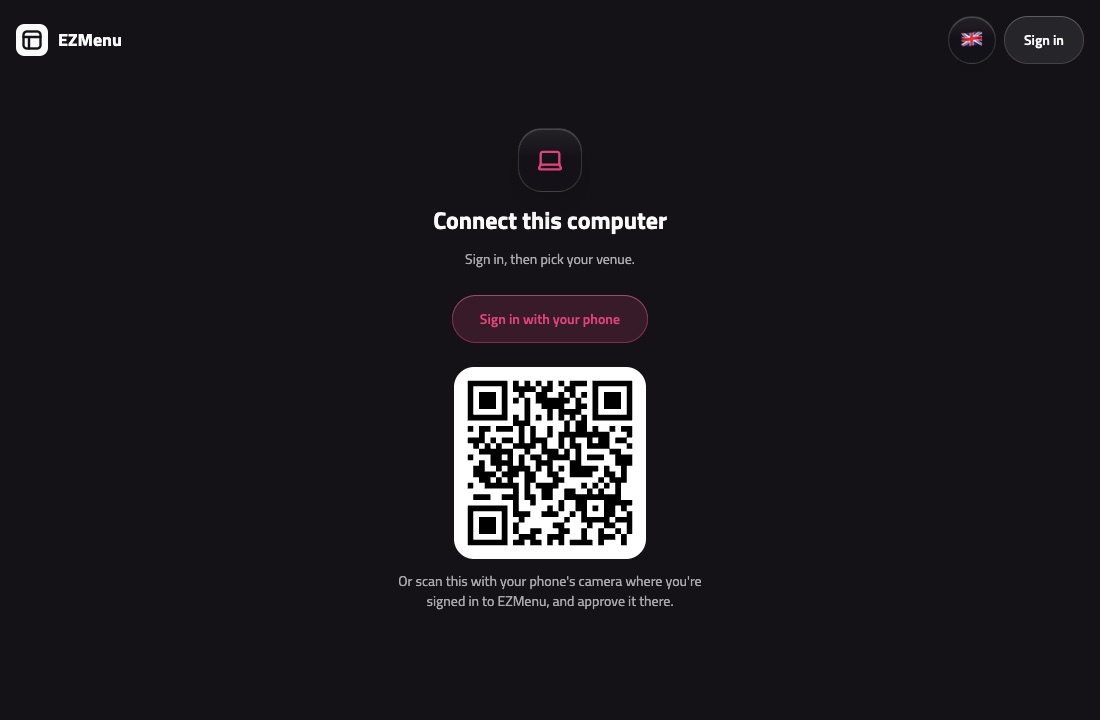
Sign in with a QR code
On a computer, scan the sign-in page’s QR code with a phone you’re signed in on and approve it. No typing numbers or codes.
Block prank guests
Block a guest who sends prank calls or orders, right from that call or order. They still see the menu as always, but can’t order or call a waiter any more, and aren’t told why.
The dashboard as an app
Install the dashboard on your phone and get a notification for every new call and order, even when EZMenu isn’t open.


Waiter calls
One tap, and a waiter is on the way!
With the waiter button always at the bottom of the menu, guests call a waiter to order, ask for the bill or get help, and can add a note. Staff on shift see each call on their phones right away, with the table number and reason.
Ready-made call reasons
Pick what guests can call for, like ordering or the bill, from a ready-made list already translated into every language.
Live status for everyone
Guests watch their call go from sent to on the way to done, and your team sees who took it. Once it’s done, guests rate the service with one tap and can tell you what went wrong.
Notifications on staff phones
Staff on shift get a notification for every new call, even when the menu isn't open. Every call also shows on the desktop app on your venue's computers, whether anyone is on shift or not.
Staff and shift management
Add your staff, give each person a role and the sections they cover, and everyone starts a shift with one tap. Guests can call a waiter whenever someone is on shift.
Insights
Decide with numbers, not guesses!
Every order, every waiter call and every menu visit turns into clear charts for owners and managers. Compare today since midnight with yesterday up to the same hour, or yesterday and the last 7, 30 or 90 days with the period before.
Sales, bills and how fast orders move
Sales with service charge and VAT, the average bill, best sellers, the busiest hours, and how long each order takes to be accepted, made and served.
Response times and busy hours
See how fast your team answers calls, how many are missed, and which days and hours are busiest, so you can plan your shifts.
Staff and tables
Compare how many calls each person answers, how fast and how guests rate them, and see which tables call most and which tables’ QR codes get scanned.
Guest ratings
Once a call is done, guests rate the service with one tap and can leave a short note when something wasn’t right. Satisfaction shows for the whole venue and for each person on your team, next to what guests said.
What guests look at
See which items get opened and noted most, which ones guests look at and skip, how many visitors go on to add something to their order notes, how far they get through your categories, the languages they read in and where they came from: Google search results, Instagram, table QR codes or links with UTM tags.
What guests can't find
See what guests search for on your menu, and every search that found nothing.


Recommendations
Nothing slips through!
The recommendations page in your dashboard shows how complete your menu is and what to do next, based on the menu itself and on what guests do with it.
How complete your menu is
A ring shows it at a glance: items with a photo and a description, and the details guests look for, like your opening hours, phone and place on the map.
Fix each with a tap
Every recommendation opens the right place: the item’s edit sheet, your venue details or your opening hours.
From what guests do
See the items guests see but rarely open, items left sold out for days, items without a price, and what guests searched for and didn't find.
Or let the AI assistant do it
It writes the missing descriptions, matches guests' searches to your items and adds your Instagram page, and shows you everything before it's saved.


Questions and answers
Got questions? We've got answers.
What can each role on the team do?
Owners and managers can do everything. Waiters handle calls, orders and bills; kitchen and bar make their orders. Waiters, kitchen and bar can mark items sold out or hide them, while editing items and prices stays with owners and managers.
How do staff hear about new calls and orders?
Staff on shift get a notification on their phones, even when EZMenu isn't open. Every waiter call also shows on the desktop app on your venue's computers.
How do staff sign in to the dashboard?
With their mobile number and a code sent by SMS. On a computer, they can also scan the sign-in page’s QR code with their phone and approve it.
What if someone sends fake orders or calls?
Block them right from that order or call. They still see the menu as always, but can't order or call a waiter any more, and aren't told why.
What can I learn from the insights?
What sells and how fast orders are made, how many waiter calls you get and how quickly your team answers them, your busiest days and hours, how guests rate the service, and what guests open, add to their notes and search for on your menu. Look at today, yesterday or the last 7, 30 or 90 days.
Do you collect guests' personal information?
No. Menu insights are anonymous: we count what is opened and searched, without names, phone numbers or accounts, and your own staff's visits are left out.
Have another question? Contact us
More of EZMenu
Explore the other parts too.
Digital menu
- Photos, videos and options, in 12 languages
- The theme you like in your colors and font, a printable menu and table QR codes
- Import your menu from a photo, Snappfood, MeNEW or Menusaz

Ordering and kitchen
- Guests order from the table, or waiters take the order
- Stations, and kitchen screens on any TV or tablet
- Ticket printing on network printers through the desktop app

AI assistant
- Manage your menu, prices and staff in a few words
- Takes orders, settles and prints bills by chat
- Translates your menu and builds it from a photo

Ready to give your guests a better menu?
Try the demo, or contact us and we'll get your digital menu up and running.